Christmas Birthday Font Review for Small Business Branding
Last month, I found myself sitting on my living room floor surrounded by kraft paper boxes, twine, and a stack of blank tags. My small bakery business had grown enough that my handwritten labels—the ones I had been scribbling with a black pen for two years—no longer looked charming. They looked rushed. I needed a font that could carry the same warmth and personality as my products but without making me spend hours hand-lettering every single box. That is when I opened up Christmas Birthday for the first time, and honestly, it changed how I think about the relationship between my brand and the typeface I choose.
Why Christmas Birthday Works for Product Labels and Packaging Design
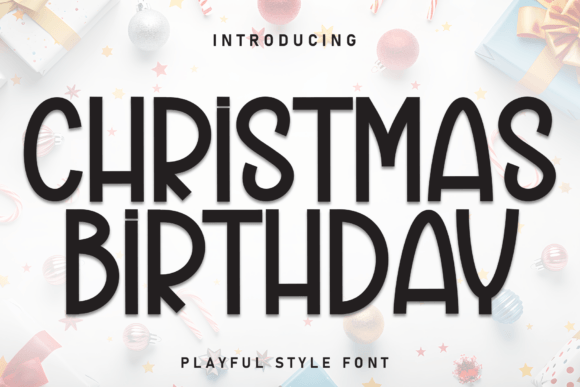
Christmas Birthday is a display font that feels like it was made for small businesses that want to look personal without looking sloppy. The letters are handwritten in style, with that marker-drawn energy that makes you think of a friend writing a note on a gift tag. But unlike my own handwriting, which gets shaky after the third box, Christmas Birthday stays consistent. Every a and every o has the same playful tilt, the same cheerful bounce. When I printed my first test label for a batch of gingerbread cookie kits, I immediately noticed how the font made the packaging feel approachable. It did not scream corporate. It whispered homemade. For a bakery owner, that distinction matters because customers buy with their eyes before they ever taste a crumb.
I tested Christmas Birthday on a few different materials. First, I printed it on matte sticker paper for my jam jars. The marker-like strokes held up well at a medium size, around 18 to 24 points, which is exactly where this font shines. It is not a font you want to squeeze into a tiny ingredient list. That is not its job. Christmas Birthday is a display font, which means it is built to grab attention on a header, a product name, or a short phrase like fresh baked or happy birthday. On my cookie boxes, I used it for the main product name and paired it with a simple sans serif for the weight and ingredients. That combination gave my packaging a layered, thoughtful look that felt professionally designed without feeling stiff.
Christmas Birthday for Social Media Graphics and Online Shop Banners
After the packaging test, I moved Christmas Birthday into my digital workspace. I run a small online shop through a basic website builder, and my Instagram feed had been feeling flat. My photos were bright and cheerful, but my text overlays looked sterile. I had been using a standard system font because I thought I had to keep things readable on mobile. But the truth is, when you are selling handmade goods, sterility is the enemy. Customers want to feel the personality behind the product. So I opened up my design app and replaced my shop banner headline with Christmas Birthday. The words treat yourself suddenly had a handcrafted energy that matched the photos of my iced sugar cookies and spiced latte candles. The font did not fight for attention. It invited people in.
I also used Christmas Birthday on Instagram Story templates for announcing weekly specials. At large sizes, the marker texture becomes visible, which adds a tactile quality to a digital image. That is rare for a font. Most display typefaces look sterile when blown up on a phone screen. Christmas Birthday keeps its human feel. I created a simple template with a pastel background, a short promotional phrase in Christmas Birthday, and a small sans serif for the date and details. It took me under ten minutes, and the result looked like I had hired a designer. For a small business owner who wears every hat, that kind of efficiency is worth more than I can say.
One thing I want to mention about using this font on social media is that it works best for short, punchy text. A single line like fresh batch today or new flavor alert lands perfectly. Longer sentences start to feel crowded because the playful letterforms demand room to breathe. That is typical for a display font, and Christmas Birthday embraces that limitation rather than fighting it. If you use it as a headline treatment and let a cleaner font handle the body copy, your graphics will look intentional and balanced.
How Christmas Birthday Creates a Consistent Brand Identity Across Print and Digital
Consistency is the thing that separates a hobby business from a real brand. I learned that the hard way. For my first year, every label, tag, and post had a slightly different look because I grabbed whatever font I had on hand. Christmas Birthday helped me unify my visual identity. I started using it on my thank-you cards, my product tags, my shop banners, and even my email newsletter header. Once I committed to one display font as the anchor of my brand, everything started to feel connected. Customers began recognizing my packaging before they saw my logo. That recognition builds trust, and trust builds repeat sales.
I also appreciate that Christmas Birthday is versatile enough to work across different seasons. Despite the name, it is not limited to Christmas or birthday celebrations. The cheerful, handwritten mood fits any occasion where you want to communicate warmth. I have used it on Valentine's Day gift sets, Mother's Day treat boxes, and even a back-to-school cookie collection. The font does not lock you into a single holiday. It locks you into a feeling. And that feeling is personal. For a small business, personal is the most valuable asset you can cultivate.
If you sell physical products, I recommend testing Christmas Birthday on a small run before committing to large quantities. Print a few labels, stick them on your product, and set them on a shelf. Step back and see how the font interacts with your packaging color and material. I tested it on a cream-colored candle jar and a brown bakery box, and it looked warm on both. On a glossy white surface, it might read differently. The marker-style texture softens on shiny stock, so keep that in mind if you print on high-gloss materials. Matte and kraft finishes seem to bring out the best in this typeface.
Pairing Christmas Birthday with Clean Sans Serif and Script Fonts
No display font works alone in a real brand system. You need a supporting cast. Christmas Birthday pairs naturally with a clean sans serif like Montserrat, Lato, or Open Sans. The contrast between the playful handwritten header and the neutral, readable body text creates a hierarchy that guides the customer's eye without confusion. I use Montserrat Light for my ingredient lists and pricing details, and Christmas Birthday for the product name. That simple pairing covers about ninety percent of my design needs, from product labels to website headers. If you want a more elegant feel, try pairing Christmas Birthday with a refined serif like Playfair Display or Cormorant Garamond. The combination of handwritten warmth and classic sophistication works beautifully for boutique brands, candle makers, and skincare lines.
I also experimented with pairing Christmas Birthday with a script font for accent words. That combination requires caution because two decorative fonts can compete. But if you use the script sparingly—maybe for a single word like handmade or limited—and keep Christmas Birthday as the dominant voice, the result can feel layered and special. The key is restraint. Let Christmas Birthday be the star, and let every other font support it.
Christmas Birthday Licensing and File Formats for Commercial Use
Before you start using Christmas Birthday on your products, take a moment to check the commercial licensing terms. Font licensing is one of those details that trips up small business owners because it is easy to assume that buying a font once means you can use it everywhere. That is not always the case. Some fonts restrict use on physical products, merchandise, or digital downloads. Others require an extended license for packaging or logos. I always recommend reading the license agreement carefully, especially if you plan to use the font on items you sell, such as candles, soaps, baked goods, or apparel. The Christmas Birthday font description does not specify restrictions, but you should verify whether your intended use is covered by a basic license or if you need an extended commercial license.
Also check the file formats included with your purchase. You will want at least OTF and TTF formats for compatibility across design software and online tools. If you use platforms like Canva, Cricut Design Space, or Adobe Express, make sure Christmas Birthday can be uploaded and used without issues. I tested it in Canva for my social media templates and in Adobe Illustrator for my print labels, and both worked smoothly. Having the font in multiple formats ensures you can use it on your computer, your tablet, and any cloud-based design tools you rely on for your business.
Look for extras like stylistic alternates, ligatures, or multilingual support. These features give you flexibility to customise the font's appearance and ensure it works for your specific product names or phrases. Even if you only need a handful of characters now, having full character coverage saves you from frustration later when you want to add a new product or phrase to your lineup.
At the end of the day, Christmas Birthday is more than a fun handwritten font. It is a tool that helps small businesses communicate warmth, consistency, and personality without needing a design degree or hours of hand-lettering. Whether you are labelling jam jars, designing Instagram templates, or refreshing your shop banner, this display font brings a marker-drawn charm that customers can feel. And for a business owner trying to stand out in a crowded market, that feeling is everything.